Flying Owl Wall Art Sign SVG File: A Practical Guide for Laser Cutting and CNC Projects
Digital fabrication has transformed how hobbyists and small business owners approach home decor. Among the myriad of designs available, the Flying Owl Wall Art Sign, SVG File stands out as a versatile option for those utilizing laser cutters, CNC routers, and other computer-controlled craft machines. This digital download is not merely a static image; it is a functional blueprint designed for precision cutting. Understanding the nuances of this file format, its compatibility with various software, and its practical applications can help creators decide if it aligns with their specific project goals.
Understanding the Digital Asset and Its Formats
The core value of the Flying Owl Wall Art Sign, SVG File lies in its adaptability. Unlike raster images (such as JPEGs or PNGs) which are composed of pixels and often lose quality when resized, vector files like SVG, DXF, and AI are based on mathematical paths. This means the design can be scaled from a small 5-inch ornament to a large 50cm wall feature without any loss of resolution or edge clarity. For laser cutting and CNC routing, this scalability is critical.
This specific digital download is provided in a comprehensive zip folder containing multiple file types, each serving a distinct purpose in the workflow:
- SVG (Scalable Vector Graphics): The most universal format, compatible with web-based design tools and many laser software suites. The included filled SVG single-layer option simplifies the process for users who prefer a solid silhouette rather than intricate line work.
- DXF (Drawing Exchange Format): A standard in the CAD world, essential for users operating older CNC machines or specific industrial software that may not support SVG natively.
- AI (Adobe Illustrator): Ideal for designers who wish to modify the owl’s features, add text, or integrate the design into a larger composition before sending it to the cutter.
- CDR (CorelDRAW): Specifically formatted for CorelDRAW users, ensuring that nodes and curves remain editable without conversion errors.
- PDF: Useful for quick previews or for users who may need to print the design as a template for manual tracing or non-digital crafts.
The inclusion of exterior cut lines in blue is a thoughtful detail for laser users. In many laser software interfaces, specific colors are assigned to different operations—typically red for engraving and blue or black for cutting. By pre-assigning the cut lines, the designer reduces the setup time required to configure the machine, allowing for a more streamlined production process.
Comparison with Other Decorative Cut Files
When evaluating the Flying Owl Wall Art Sign, SVG File against other digital cut files, several factors come into play: complexity, material suitability, and aesthetic versatility.
Complexity and Cut Time
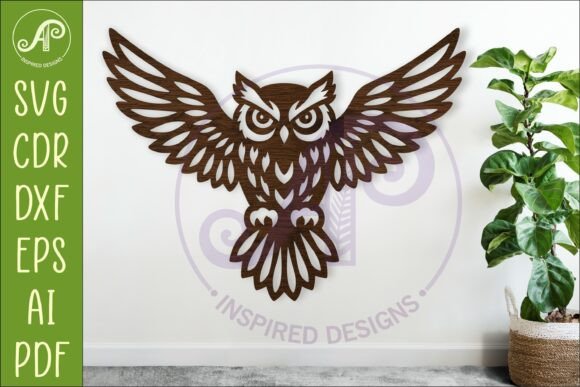
Owl designs vary significantly in intricacy. Some feature hyper-realistic feather details that require high-powered lasers and slow cutting speeds to prevent charring, while others are minimalist silhouettes. The flying owl design discussed here strikes a balance. It offers enough detail to be visually interesting as a wall sign but remains efficient enough for batch production. Compared to highly complex mandala-style owl patterns, this design is less prone to breakage during the weeding process (removing excess material) and requires less machine time, making it cost-effective for small businesses.
Material Versatility
Not all SVG files are created equal regarding material application. Thin, delicate designs may struggle in materials like plywood or acrylic if the bridges (connecting pieces) are too narrow. This particular design is optimized for structural integrity. When cut at the recommended size of 29.5cm (approximately 12 inches) wide, the proportions ensure that the wings and body maintain sufficient strength. This makes it suitable for a wider range of materials, including:
- Wood Plywood: Provides a rustic, natural look ideal for farmhouse or woodland-themed decor.
- Acrylic: Offers a modern, sleek appearance, especially when using mirrored or translucent sheets.
- MDF (Medium-Density Fiberboard): A cost-effective option for painted finishes.
- Metal: For users with plasma cutters or specialized metal laser cutters, the vector paths allow for durable outdoor signage.
In contrast, simpler silhouette-only files might lack the visual depth required for a standalone wall sign, necessitating additional layering or background elements. The flying owl design often works well as a single-layer piece, though it can also be layered for a 3D effect if desired.
Practical Applications and Sizing Considerations
One of the primary advantages of purchasing a digital download like the Flying Owl Wall Art Sign, SVG File is the freedom to customize dimensions. The recommended size range of 25 to 50cm allows for flexibility depending on the intended display location.
For a nursery or child’s bedroom, a smaller 25cm cutout can serve as a subtle accent above a crib or changing table. At this size, the details remain visible without overwhelming the space. Conversely, for a living room feature wall or an entryway, scaling the design to 50cm creates a bold statement piece. When scaling up, it is advisable to check the thickness of the material being used. Thicker materials may require slight adjustments to the design’s internal gaps to account for the kerf (the width of the cut removed by the laser beam), ensuring pieces fit together correctly if assembly is required.
It is important to note that this listing is for a DIGITAL DOWNLOAD ONLY. No physical item will be mailed. This distinction is crucial for buyers accustomed to purchasing finished goods. The value proposition here is the ability to produce multiple units or customize the finish. Once the zip folder is downloaded and extracted, the user has full control over the production timeline and material choice.
Decision Factors: Is This Design Right for You?
Choosing the right digital file depends on your equipment, skill level, and end goal. Here are some considerations to help determine if the Flying Owl Wall Art Sign, SVG File is the appropriate choice for your next project.
When This File Is a Strong Choice
- You Own Compatible Machinery: If you have access to a laser cutter, CNC router, or plasma cutter, this file is ready to use. The variety of formats (DXF, AI, CDR) ensures compatibility with most professional and prosumer software.
- You Need Quick Turnaround: The pre-formatted cut lines and single-layer options reduce preparation time. For sellers fulfilling orders, this efficiency translates to higher productivity.
- You Want Customization Freedom: Because the file is editable in programs like Adobe Illustrator or CorelDRAW, you can add names, dates, or other graphical elements to personalize the sign for gifts or special occasions.
- You Prefer Natural or Rustic Aesthetics: The owl motif pairs exceptionally well with wood grains and earthy tones, fitting seamlessly into popular interior design trends like bohemian, rustic, or nature-inspired themes.
When You Might Consider Alternatives
- Lack of Cutting Equipment: If you do not own a laser cutter or CNC machine, this file will not be useful unless you have access to a local makerspace or a service bureau that accepts customer-supplied files. For casual crafters without such access, a pre-cut wooden sign or a printable paper template might be more practical.
- Desire for Complex Multi-Layering: While this design can be layered, it is primarily structured as a single-cut piece. If you are looking for intricate shadow box effects with five or more layers, you might need a design specifically engineered for deep stacking.
- Minimalist Modern Preference: If your design preference leans towards ultra-modern, geometric abstraction, a realistic or semi-realistic flying owl might not align with your aesthetic. In such cases, a geometric owl silhouette or an abstract bird shape might be a better fit.
Technical Tips for Best Results
To maximize the quality of your final product when using the Flying Owl Wall Art Sign, SVG File, consider these technical best practices:
Test Cuts: Always perform a test cut on a scrap piece of your chosen material. This helps you dial in the correct power and speed settings for your specific machine. Materials vary even within the same category; for example, birch plywood from one supplier may cut differently than another due to glue composition and density.
Node Editing: If you notice jagged edges on curved sections of the owl’s wings, use the node editing tools in your software (such as Inkscape, Illustrator, or LightBurn) to smooth the paths. While the provided file is optimized, minor adjustments can sometimes improve cut quality on lower-resolution machines.
Finishing: After cutting, sanding the edges lightly can remove char marks from laser cutting or tool marks from CNC routing. For wood, a clear sealant or stain can enhance the grain and protect the sign. For acrylic, polishing the edges can restore transparency if flame polishing is not an option.
In conclusion, the Flying Owl Wall Art Sign, SVG File represents a robust resource for digital fabricators. Its multi-format availability, scalable vector nature, and balanced design complexity make it a reliable choice for both personal projects and small-scale commercial production. By understanding the file’s capabilities and matching them with your equipment and aesthetic goals, you can create high-quality, personalized wall art that stands out in any space.