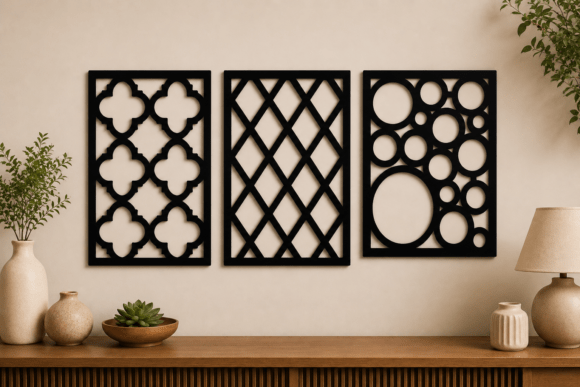
Geometric Wall Panel SVG Bundle: A Practical Guide to Flawless Laser Cutting
Creating stunning interior decor requires more than just a good eye for design; it demands precision in execution. Whether you are a seasoned CNC operator or a hobbyist using a desktop cutter like Cricut or Silhouette, the foundation of any successful project is the quality of your digital files. This is where a Geometric Wall Panel SVG Bundle becomes an invaluable asset. These designs offer a modern, architectural aesthetic that elevates plain walls into focal points. However, many creators rush into purchasing or downloading files without understanding the technical nuances that separate a professional finish from a frustrating waste of material.
The appeal of geometric wall panels lies in their versatility. They can transform a living room, office, or retail space with minimal effort. Yet, the difference between a crisp, clean cut and a jagged, unusable piece often comes down to file preparation and machine compatibility. By understanding common pitfalls, you can ensure that every sheet of wood, faux leather, or acrylic you cut results in a high-quality product ready for installation.
Understanding File Compatibility and Machine Limits
One of the most frequent mistakes beginners make is assuming that all vector files work identically across all machines. While the Geometric Wall Panel SVG Bundle includes multiple formats—SVG, DXF, PNG, and EPS—not every format is suitable for every workflow. For instance, using a PNG file for laser cutting is generally a poor choice unless you are strictly doing print-and-cut operations or need a reference image. PNGs are raster images, meaning they are made of pixels. When scaled up for large wall panels, they lose resolution, leading to pixelated edges that confuse cutting software.
Instead, always prioritize vector formats like SVG, DXF, or EPS for cutting tasks. Vectors use mathematical paths, ensuring that your design remains sharp and smooth regardless of size. If you are using a CNC router, DXF files are often the industry standard due to their compatibility with CAD software. For laser cutters and desktop crafters, SVG files are typically the most user-friendly. Before you begin, verify which format your specific software prefers. Loading the wrong file type can lead to unnecessary conversion steps, which may introduce errors such as open paths or overlapping nodes that cause the machine to cut incorrectly.
The Trap of Ignoring Material Constraints
Another critical oversight involves ignoring the physical limitations of your chosen material. Geometric designs often feature intricate patterns with thin lines and small details. While these look beautiful on screen, they can be fragile when cut from certain materials. For example, cutting a complex geometric pattern from thin paper or low-grade cardboard may result in tearing or structural weakness. Conversely, using thick hardwood without adjusting your laser power or CNC bit size can lead to burn marks or incomplete cuts.
To avoid this, consider the end use of your panel. If you are creating outdoor hangings, you must select weather-resistant materials like treated wood or acrylic. For indoor decor, MDF and plywood are popular choices, but they require careful handling to prevent splintering. Always perform a test cut on a scrap piece of the same material. This simple step allows you to adjust speed, power, and pressure settings before committing to your final piece. It saves both time and money by preventing ruined materials.
Overlooking Scale and Proportion
Designs in a Geometric Wall Panel SVG Bundle are scalable, but scaling them incorrectly can distort the visual impact. A pattern that looks balanced on a small sample may appear cluttered or sparse when expanded to cover an entire wall. Many creators fail to visualize the final scale, leading to panels that overwhelm a small room or get lost in a large space.
Before cutting, use design software to mock up the panel at its intended size. Check the spacing between geometric elements. If the gaps are too narrow, the structure may become weak. If they are too wide, the design may lack cohesion. Additionally, ensure that the overall dimensions fit within your machine’s cutting bed. If you need to tile multiple pieces together, plan for seam allowances and alignment markers. Proper planning ensures that the final installation looks seamless and professional.
Neglecting Post-Processing Requirements
Many users expect the cut piece to be ready for display immediately after removal from the machine. This is rarely the case. Laser-cut wood often has charred edges, and CNC-routed materials may have rough surfaces. Failing to account for post-processing can result in a product that looks amateurish. Sanding, painting, or sealing are essential steps that enhance durability and aesthetics.
For wood panels, light sanding removes burn marks and smooths rough edges. Applying a primer before painting ensures even coverage, especially on porous materials like MDF. If you are using faux leather or fabric, consider backing the cutouts with a stabilizer to maintain shape and prevent fraying. These finishing touches not only improve the look but also extend the lifespan of your decor, making it suitable for both indoor and outdoor environments.
Choosing the Right Bundle for Your Needs
When selecting a Geometric Wall Panel SVG Bundle, look for packages that offer comprehensive file support. A high-quality bundle should include SVG files for scalability, DXF for CNC compatibility, PNGs for preview or print purposes, and EPS for advanced editing in professional design software. The inclusion of these varied formats ensures that you can work with whatever tools you have available.
Additionally, check for clean vector paths. Poorly designed files may have duplicate lines, unclosed shapes, or excessive nodes, which can cause cutting errors. Reputable designers test their files extensively to ensure clean cuts and easy usability. If a seller provides detailed instructions or support, it is a good indicator of quality. Do not hesitate to reach out with questions before purchasing. A responsive seller can provide valuable insights into best practices for their specific designs.
Maximizing Efficiency and Creativity
Using pre-made designs does not mean you cannot add your personal touch. Many creators modify existing SVGs to suit specific projects. You might combine different geometric patterns, adjust line weights, or integrate text elements. However, always save a copy of the original file before making changes. This allows you to revert if needed and keeps the original design intact for future use.
Organize your files logically. Create folders for different projects, materials, and machine settings. This practice saves time when you return to a design months later. Label your files clearly, including details like material type, cut settings, and date. Efficient organization reduces frustration and helps you build a library of reliable, tested designs.
In conclusion, a Geometric Wall Panel SVG Bundle is a powerful tool for creating modern, custom decor. By avoiding common mistakes related to file compatibility, material selection, scaling, and post-processing, you can achieve professional results. Take the time to understand your tools and materials, and always prioritize quality over speed. With careful planning and attention to detail, you can transform simple digital files into stunning physical artworks that enhance any space.